Best Presentation Apps for 2026
In today’s fast-moving digital world, engaging presentations have become an important part of how we share ideas, teach, and do business. And it’s not just for big companies anymore – anyone can create professional presentations easily. Students, freelancers, and small businesses all rely on online presentation tools to tell their stories visually.
While Microsoft PowerPoint is still widely used, it’s no longer the only choice. Today, many modern presentation apps are more affordable, easier to use, and packed with smart features – some even use AI to design slides automatically.
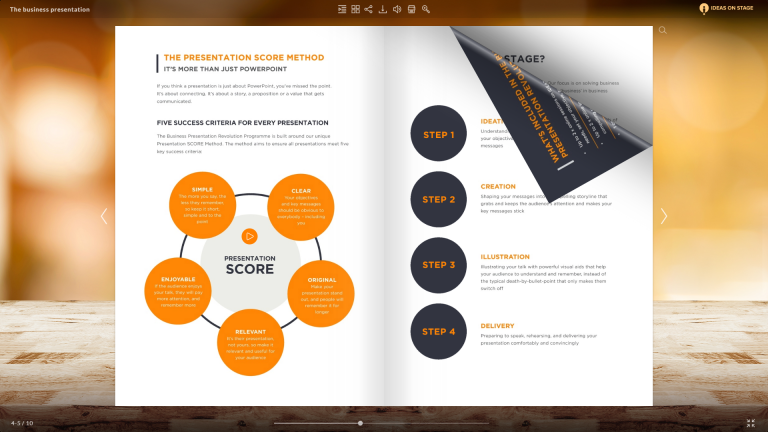
Publuu’s online flipbook example
View more online presentations
Because there are so many options, choosing the right presentation app can feel overwhelming. To make things easier, we’ve prepared a list of the best presentation apps for 2026, based on their ease of use, smart design tools, collaboration features, and compatibility across devices.
What are presentation apps?
Presentation apps are software tools that help you create and show slideshows or visual stories. These tools usually include templates, design elements, animations, and even AI support to make your presentations look professional.

With the right presentation app, you can organize your ideas visually and clearly - whether you’re teaching, pitching a project, or speaking at an event.
Choosing the right presentation app
When selecting presentation software in 2026, look for these key features:
User-friendly interface
The best presentation apps are easy to use, even for beginners. A clean, simple design lets you focus on your ideas, not on learning complicated tools.

Customization options
Good apps offer plenty of ways to personalize your work - templates, colors, fonts, and layouts - so your presentation fits your brand or style.
Multimedia and AI features
Modern tools make it simple to add videos, images, animations, or even interactive charts. Some apps now include AI slide builders, which can create presentations automatically from your text or notes.

Collaboration and cloud access
Look for cloud-based apps that save your work online. This way, you can edit your presentation from any device and collaborate with teammates in real time.
Top presentation apps
Here are some of the best presentation apps available in 2026. Each offers something unique - from powerful AI tools to real-time collaboration.
1. Publuu (recommended)
Best for: Turning PDFs into interactive online presentations.
Publuu lets you upload and share your presentations as interactive flipbooks with links, videos, and animations.
Pros:
- Adds realistic page-turning effects.
- Tracks viewer engagement.
- Easy sharing via link or embed.
Cons:
- Requires another app (like Canva or PowerPoint) to create the original PDF.
2. Canva
Best for: Beginners and designers who want fast, beautiful results.
Canva remains one of the top tools for creating presentations online. In 2026, it’s Magic Design and Magic Write features use AI to turn your text into finished slides in seconds.
Pros:
- Easy drag-and-drop editor.
- Large library of templates, photos, and icons.
- AI tools that create full slides automatically.
- Works on desktop, tablet, and mobile.
Cons:
- Some advanced features require a paid plan.
3. Gamma
Best for: AI-powered storytelling and fast content creation.
Gamma has become one of the most popular presentation tools in 2026. It can build an entire slide deck from a short text prompt and organize your content beautifully.
Pros:
- Instantly turns ideas into professional slides.
- Great for reports, lessons, or pitch decks.
- Supports video, embeds, and analytics.
Cons:
- Limited offline access.
4. Beautiful.ai
Best for: Business users who want smart, consistent design.
Beautiful.ai uses artificial intelligence to automatically adjust slide layouts for balance and clarity. The new Smart Designer 2.0 keeps every slide aligned with your brand.
Pros:
- AI layout suggestions.
- Branded templates.
- Team collaboration options.
Cons:
- Limited design flexibility for advanced users.
5. Google Slides
Best for: Collaboration and education.
Google Slides remains a favorite for its simplicity and teamwork features. In 2026, it’s even smarter with Gemini AI that suggests layouts, designs, and even full slides.
Pros:
- Free and easy to use.
- Real-time collaboration.
- Integrated with Google Drive, Docs, and Meet.
- AI layout suggestions.
Cons:
- Limited design options compared to paid tools.
6. Microsoft PowerPoint (with Copilot)
Best for: Professionals and corporate teams.
PowerPoint has evolved with Microsoft Copilot, its built-in AI assistant. Copilot can generate slides, summaries, and visuals directly from Word or Excel data.
Pros:
- Advanced animations and transitions.
- AI assistance for content creation.
- Integrated with Teams and OneDrive.
Cons:
- Paid subscription required for full features.
If you're looking for Powerpoint alternatives, you can find many similar presentation tools in our Knowledge Base.
7. Pitch
Best for: Teams and startups.
Pitch combines design, collaboration, and analytics in one modern platform. It’s especially popular among business teams creating reports and investor decks.
Pros:
- Real-time team collaboration.
- Pre-built templates for marketing and startups.
- Integrates with Slack, Notion, and HubSpot.
Cons:
- Some features require a paid workspace.
8. Tome
Best for: Creative storytelling.
Tome is an AI storytelling tool that creates narrative-style slides. Just type an idea, and this tool builds a full visual presentation - perfect for teachers, writers, or marketers.
Pros:
- AI-powered slide creation.
- Easy to edit and share.
- Works across devices.
Cons:
- Limited customization options.
9. Keynote
Best for: Apple users.
Apple’s Keynote remains a top choice for Mac and iPad users thanks to its elegant design. In 2026, it supports AR previews and seamless integration with Apple Vision Pro.
Pros:
- Free for Apple devices.
- Beautiful templates.
- Great for multimedia presentations.
Cons:
- Only available on Apple platforms.
10. Visme
Best for: Marketing and visual reports.
Visme combines presentation design with data visualization. It’s great for creating infographics, interactive slides, or social media graphics.
Pros:
- Data visualization tools.
- Analytics to track views.
- Brand templates and assets.
Cons:
- Some templates locked behind paid plans.
Why Presentation Apps Matter in 2026?
Presentation apps are more important than ever. They help people communicate ideas visually - whether in classrooms, online meetings, or global conferences.
Aesthetics and visual consistency
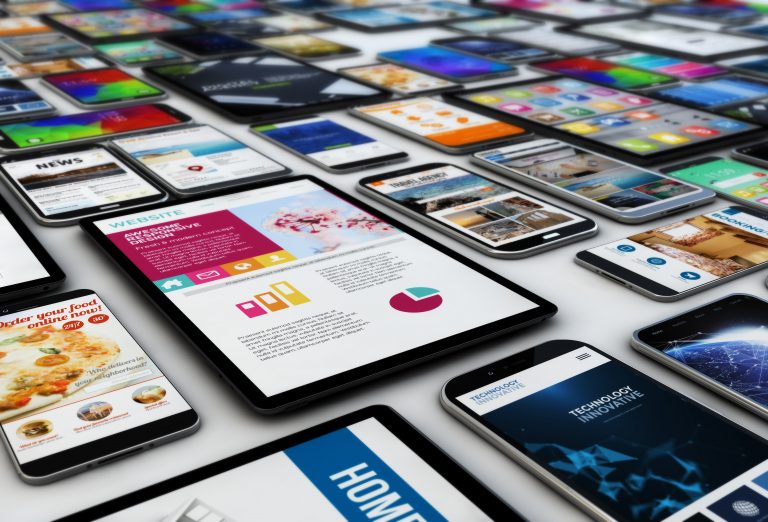
Modern tools make it easy to create slides that look professional and match your brand. Good design helps your audience remember key information.
Engaging and interactive content
With built-in multimedia, animations, and AI tools, presentations in 2026 can feel more like stories - engaging, interactive, and easy to follow.
Global reach
Thanks to cloud access, your presentations can reach audiences anywhere in the world. Collaboration, real-time editing, and sharing links make presenting globally effortless.
Summary
It's hard to say what's the best presentation software on the market. Publuu lets you display excellent presentations, but to create them you need other presentation tools. Luckily, there are many alternatives on the market and anyone can find a great tool that would help to create a beautiful presentation.
In 2026, presentation apps are smarter, faster, and more creative than ever - helping anyone turn ideas into visuals that truly connect with people.
You may also be interested in:
10 Tips on How to Start a Presentation and Impress Your Audience