How branding strengthens your digital documents
Think about how you discovered your favorite app or that music label you're into. Sure, maybe you saw an ad, but more likely? You just kept seeing their stuff pop up everywhere... and eventually, you started recognizing their look and feel. That's branding - the colors, the style, the vibe. And it shouldn't stop at your social media or your homepage. It should show up in every document you send out, too.
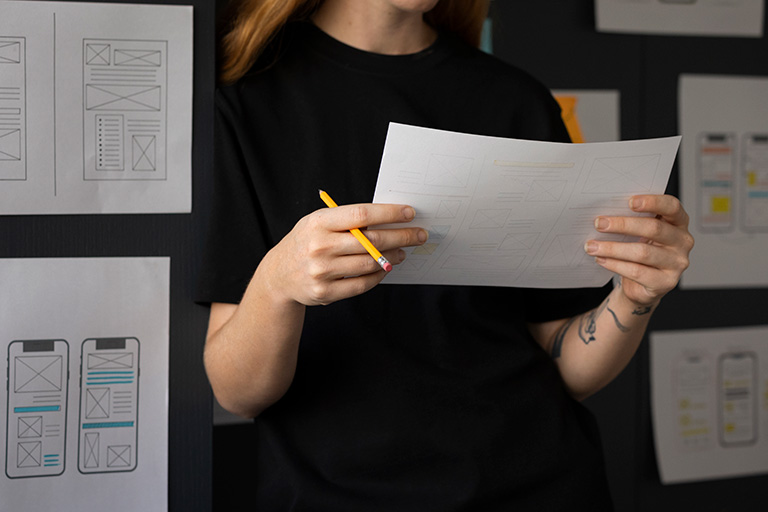
Here's the thing: people actually judge your company based on the documents you send them. A PDF proposal, a digital flipbook, a report, a product brochure - these things get passed around way more than your website does.
In this article, we'll show you how to turn a regular PDF into a something that people might look at - basically a cooler, more professional way to show off what you're offering.
Branding does not end with your website
Let's be real - if you're thinking about buying a BMW, the last place you'll go to find out if it's actually worth is actually bmw.com. A website can be the heart of a brand's identity, sure, but branding stretches much further than that.
Branding is a company's personal style, what it says and how it looks. The logo, the signature colors, the shapes it gravitates toward. Take Microsoft: ever since Windows 8, they've committed to that well-known clean Metro aesthetic - flat colors, sharp-cornered rectangles, sans-serif fonts. And it doesn't just live in the software. Their documents, PDFs, social media posts, emails, even customer support - they all follow the same visual language.
That's the thing: staying consistent across every single touchpoint. Contact with the customer is present everywhere - especially if we're talking about the document. Below, you can see an example of what a well-branded flipbook looks like in practice.
Publuu’s online flipbook example
Every document affects how people see your brand
The way your documents look, can say more about you than you think. Most companies don't go beyond Word's default settings when making their PDF documents - and let's be honest, it works. So, if you want to stand out, even something as simple as add a logo and your own branding can change your documents into something a thousand times more professional.
Why is this important? Because inconsistent design creates distance. If a client sees visual chaos in your documentation, a warning immediately goes off - is this really the same company? People judge credibility by what they see, whether they mean to or not. So make sure what they see matches the image you're trying to project.
Proposals, reports and brochures matter
Your brand symbol might feel like a small detail in a day-to-day email, but in a proposal or a product brochure, it's essential. It's your visual signature - to put it in simple terms it lets all these decision-makers know exactly who they're dealing with before they've read a single word.
Remember that documents have a life of their own - they circulate, get forwarded, and analyzed without you even in the room. So, basically, they must speak for themselves. If you're releasing something outside the company, make sure it has:
⭐ An aesthetically pleasing cover
⭐ A consistent design throughout
⭐ A clear, easy-to-follow layout
⭐ A version number
⭐ Your contact information in one visible spot
Take a look at this annual report as an example of branding done right:
Publuu’s online report example
What happens when your branding is not consistent
A lack of consistency in branding is the quickest way to lose trust. On a small scale, it might work - no one expects high branding from a freelance copywriter, am I right? Though, when you're competing with giants, you need to not only stand out but, above all, demonstrate that you're playing in the same league.
Imagine this: you're an employee at a large corporation and you're handed a price list. You see a plain, gray table with no logo, no colors, and no distinctive font. How are you supposed to know who you're even dealing with? Exactly. Credibility is often a brutal mental shortcut: if it looks professional, people assume they can trust it. If it doesn't, they move on.
Document design shapes the first impression
First impressions are unforgiving - and they rule. In marketing, we'd love to believe that brilliant copy and substance are all that matter. But the truth is more brutal than that: people have little time and even less patience. They rely on their instinct.
Research shows that we form an opinion about aesthetics in roughly 50 milliseconds. Documents work the same way. The cover, the first page, the overall cleanliness of the layout - all of it sets the reader's attitude toward everything that follows.
Try a simple experiment: show a stranger person the first page of your proposal for five seconds, close your laptop, and ask her three questions. Who is this company? What's their quality level? What's their style? The answers might surprise you.
Clean design builds trust

Clean design isn't decoration. It's a clear hierarchy - specific titles, well-defined subtitles, breathing room between paragraphs, and consistency from start to finish. This makes life easier not just for you or maybe your workers when editing, but more importantly for the person reading it.
A few things worth keeping in mind:
- Stay disciplined with fonts - one for body text, another for headlines. That's enough, maybe you can add one decorative one.
- Use formatting styles properly - don't just bold a line of text and call it a heading. Without defined styles, everything falls apart the moment someone copies your content into another program.
- Be consistent with graphics - if you go with illustrations, don't randomly throw in photos halfway through. If you choose photography, stick to a single visual theme - warm and natural, or clean and studio-lit. Pick a thing.
- Even the Stanford guidelines for web credibility make it clear: professional layout and polished typography are crucial for your credibility. Major companies have entire departments dedicated to this. You don't need one - just start with a solid template and stick to it.
The format you choose makes a difference
Most companies send a plain file and call it a day. But if you want to genuinely step up, consider turning that static document into an interactive catalog.
A Publuu flipbook isn't just a digital page-flip effect. It's a multimedia publication where you can embed videos, add clickable links, and include slideshows. Things a regular PDF just can't do because this format is meant simply to be generic.
And on top of that, you gain access to advanced analytics. You'll actually know whether your proposal was opened, how long someone spent on each page, and where they dropped off.
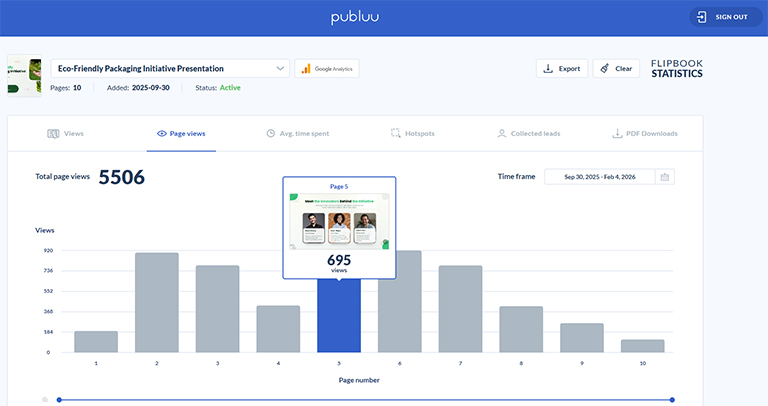
A document can be just a file or part of your brand
When your document has a consistent look, good presentation, and logical structure, it stops to be just another attachment in the inbox. It starts to feel intentional. Especially when you embed it directly on your website using Publuu’s HTML5 viewer.
You will see the difference right away. Instead of just seeing another digital piece of paper, the person reading the file sees something unique: a polished price list with your logo in the background and a distinctive, modern layout. Now your content looks professional.
Even a simple document created from a standard template can gain a unique and professional style. You can customize the favicon, set your own background, and even add a musical theme. These details will easily make your brand memorable.
The limits of standard PDFs
PDFs are everywhere, and for good reason - since the 1990s, they've guaranteed that a file will display the same way on any device. But what was revolutionary thirty years ago can feel outdated today, especially on smartphones. Limitations of these PDFs today:
❌ Lack of responsiveness - a fixed PDF layout on a small phone screen means constant zooming and scrolling.
❌ Accessibility barriers - if a PDF isn't correctly prepared with proper tags and alt text, screen readers can't handle it at all, locking out a significant portion of your potential audience.
❌ An information black hole - you send a PDF by email and then... nothing. You have no idea if anyone opened it, what interested them, or where they stopped reading. Without additional tools, that data is just gone.
Digital documents that reflect your brand identity
Your digital documents are your brand's calling card. Colors, fonts, image style, page layout-all of these contribute to a single impression. The major companies understand this and pay attention to every detail when preparing all types of documents - so why don't you?
Publuu goes a step further, offering tools that regular PDF files don't.
The document title appears in the browser bar, making it super-easy to find. A custom logo and favicon make the whole thing look like a dedicated application, not just a random sheet of paper.
When creating a flipbook, you have full control over the background, colors, and page-turning effects. You can choose a pre-made interactive background or add your own graphics to match your visual identity. See how to apply these branding features in the video below.
Consistency makes your brand stronger
The more often a recipient sees the same signals, the same colors, logo, or writing style, the faster they recognize your company. And they'll think "Oh, it's that thing", which makes you more trustworthy after all.
You've seen this play out with the giants: Amazon owns a specific shade of yellow, Apple is synonymous with silver and minimalism with devices, and Microsoft's distinctive font tells you whose product you're looking at before you've even read the label. Your documents can work the exact same way - if you let them.
Using the same colors, logo and style everywhere
We all know the first rule of marketing: stand out or dissapear. Here are some essentials for a cohesive brand:
✔️ Focus on the logo - if your brand mark is something common, say, an open book, ask yourself: what makes your book different from a thousand others?
✔️ Color palette - choose one primary color, one or two secondary tones, and a neutral background. Record their exact codes (HEX and RGB) in a stylebook so you never end up with five slightly different shades of blue across your materials.
✔️ Typography - clearly define the headings (H1/H2), body text, and captions. Ensure consistent line spacing, square grid and spacing, they create a sense of order which readers notice, even if they don't know these principles by heart.
✔️ Consistent components - don't redesign the wheel every time. Have a template for the cover, title page, tables, charts, and footer.
✔️ Tone of voice - establish 5 simple communication rules. For example: "We write concisely, avoid corporate jargon, and always address clients on a first-name basis". Consistency in words builds a bond just as much as color.
Sharing documents in a way that feels professional
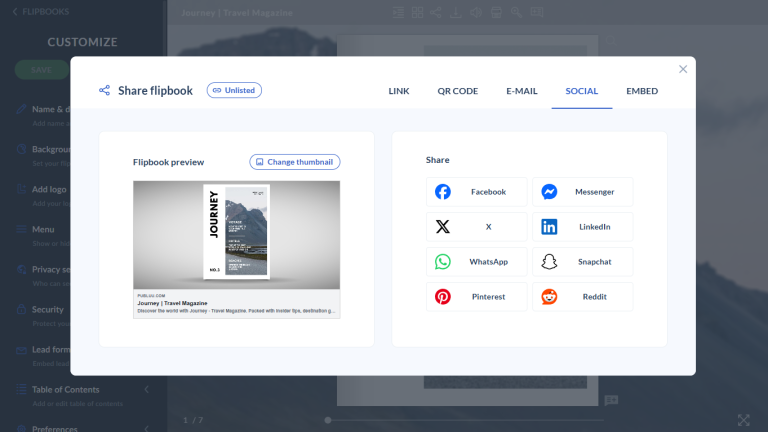
Sharing a document professionally isn’t just about sending a file. It’s about choosing the right way to present and distribute it, depending on who it's for and where it will be seen.
Here are a few practical ways to share it as a flipbooks:
- 🔗 Direct link - simply copy and send the link. The recipient can open it instantly in their browser without downloading anything.
- 📍 Link to a specific page - you can share a link that opens the document on a chosen page, which is helpful when you want someone to focus on a particular section or offer.
- 📱 QR code - each flipbook comes with a QR code that can be added to printed materials, business cards, or presentations, making it easy to access from a phone.
- 🌍 Social media sharing - post the link on platforms like LinkedIn or Facebook so readers can view the document directly, without dealing with attachments.
- ✉️ Email sharing (without attachments) - instead of sending a heavy PDF file, you can include a clean link in the email body or even in your signature.
- 🌐 Website embed - you can embed the flipbook directly on your website, so it feels like a natural part of your online presence rather than an external file.
- 📚 Virtual bookshelf - if you have multiple publications, you can display them together in one organized space instead of sharing them one by one.
Each option gives you flexibility. It depends whether you’re sending a proposal to one person, sharing a catalog publicly, or presenting a collection of materials in one place.
Good branding supports better business results

What does good branding really give you?
✅ Clarity of message: A well-designed, and readable document simply means less questions from the client. Everything is handed to that person on a silver platter, so you don't waste time explaining the obvious and can effectively work more efficiently.
✅ Express credibility: You look solid and professional. Good design says, "We know what we're doing - trust us".
✅ Faster decisions: Consistency reduces friction and uncertainty. When the image aligns with the content, it's much easier for the client to say, "I'm in".
Strong branding goes beyond your website
Your website may be the center of your online presence, but your documents are visible... well, everywhere. They can reach inboxes, boardrooms, and internal meetings. Make sure they're recognizable as your creations.
Publuu lets you integrate your brand with the simple PDF in unique ways, by adding icons, backgrounds, music and even animations - show us how you do it on your social media!
You may be also interested:
What is branded content? Definition, examples, and how it works
What is a brand kit and how to create it