How to create an effective customer satisfaction survey (with example)
What is your business really about? It’s about matching your offer to your customers’ needs. To do this, you must know what your customers want and whether you’re meeting their expectations. The best way to find out is through surveys.
Many believe that silence means satisfaction, but as your company grows, you need reliable tools to collect and analyze feedback - from quizzes and data analysis software to HTML5 flipbooks that help you present results clearly and engagingly.
In this article, you’ll learn everything you need to know about creating, implementing, and analyzing effective surveys - from basic definitions to practical tips.
What is a customer satisfaction survey?
A customer satisfaction survey is a tool for collecting feedback about your customers’ experience with your product, service, or brand. While paper and phone surveys were once common, interactive online forms are now the standard.
Surveys can appear at different points in the customer journey:
- After a purchase – to evaluate the product and transaction process.
- After contacting customer service – to rate the quality of support.
- While browsing websites – to understand the overall experience.
Their goal is to uncover what customers love, what frustrates them, and where there’s room for improvement.
What truly matters, however, is what happens next. The data you collect turns into measurable insights that, when analyzed, guide concrete actions and help shape your business strategy.

What is customer satisfaction score (CSAT)?
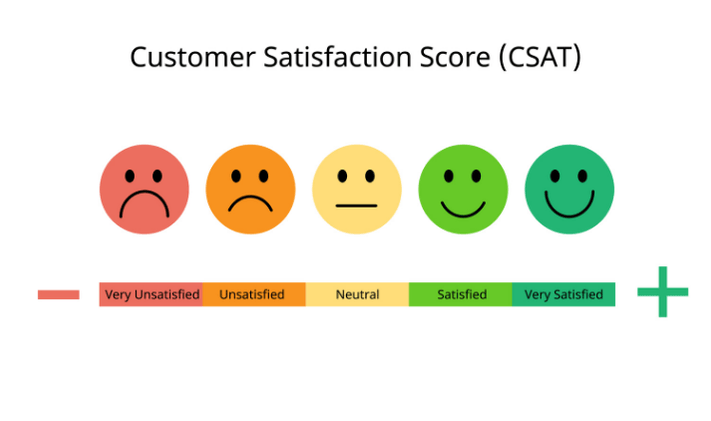
CSAT (Customer Satisfaction Score) measures how satisfied customers are with a specific interaction, whether it’s a product, service, or overall experience.
Customers are usually asked to rate their satisfaction on a scale from 1 to 5. The result is then expressed as a percentage:
CSAT = (Number of satisfied responses ÷ Total responses) × 100
For example, if 80 out of 100 respondents give a rating of 4 or 5, your CSAT is 80%. It’s important to define what "satisfied" means in your survey, such as ratings of 4 and 5, to ensure consistency.
CSAT is effective because it captures feedback in real time, right after a purchase or customer service interaction.
⭐ What’s a good score?
It depends on your industry. In general:
Above 75% is considered good, and 80 to 90% is excellent.
So the next time you leave a five-star rating for a smooth experience, remember that for the company, this simple score provides valuable insight into customer satisfaction.
The importance of measuring customer satisfaction
How can you grow your business if you don’t know whether your customers are happy? Sales figures alone don’t tell the full story. Your product might be great but missing one key feature that drives users to competitors, and you’d never know without asking.
A satisfied customer is like gold. They buy more and recommend your brand. According to SuperOffice research, referrals alone can boost profits by up to 80%.
A dissatisfied customer, however, can damage your reputation fast. Negative online reviews can discourage potential buyers and cause customer churn - sometimes up to 20–30% losses.
That’s why surveys matter. They reveal problems early, track progress, and help build a stronger brand with happier customers.

Best practices for building customer satisfaction surveys
Want high response rates and meaningful insights? Follow these proven best practices to make your surveys effective and actionable.
1. Keep it short
Don’t waste your customers’ time. Limit surveys to 5-10 questions that take no more than 5 minutes to complete. Beyond that, completion rates drop sharply. Instead of detailed, step-by-step questions, use broad ones like:
"How easy was it to find and order the product on our website?" (Scale 1–5)
2. Start broad, then go deep
Begin with general metrics such as CSAT, NPS (Net Promoter Score), or CES (Customer Effort Score), then move into specifics.
Examples:
- NPS: "On a scale of 0–10, how likely are you to recommend our company to friends or colleagues?"
- CSAT: "How would you rate the quality and speed of the support you received?"
3. Mix question types
Combine quantitative (e.g., scales) and qualitative (open-ended) questions. Keep them neutral and unbiased.
Poor: "Did you like our new, fantastic one-click payment feature?"
Better: "How useful do you find the one-click payment feature?" (Scale 1–5)
Example open-ended question:
"What can we do to improve your experience with our product?"
4. Send surveys at the right time
Timing is key. Send surveys right after key interactions, such as a purchase or a support call. Avoid peak email times (like early mornings). If possible, use in-app popups instead of emails to increase response rates.
5. Optimize for mobile and accessibility
Most responses these days come from smartphones. Ensure your survey is fully responsive, with high-contrast visuals, large buttons, readable fonts, and accessibility (A11y) support for screen readers.
6. Test before you send
Always run a pilot test on a small internal or test group. Make sure questions are clear, links work, and data is collected properly. Testing also helps identify misunderstandings - for example, when customers rate support poorly because of a product pricing issue.
7. Offer thoughtful incentives
A small incentive, such as a discount, loyalty points, or access to an exclusive flipbook guide, can increase participation. Keep it modest, as large rewards may bias results. Many customers will still respond voluntarily if the survey is short and integrated naturally within your app.

Types of customer satisfaction questions
To keep surveys engaging and insightful, use a variety of question types:
- Rating scale (1–10 or stars): "Rate your experience from 1 to 10" (ideal for calculating CSAT)
- Open-ended: "What can we do better?" (use sparingly - one is usually enough)
- Agree/Disagree (Likert scale): "Our support team handled your issue quickly" (1 = strongly disagree, 5 = strongly agree)
- Yes/No: "Did you have a good experience?"
- Multiple choice: "How did you hear about us?"
- (a) Media
- (b) Recommendation
- (c) Advertisement
✅ Pro tip: Mix closed and open questions. Scales show trends, while open-ended answers explain the reasons behind them. Keep questions neutral to avoid bias.
Customer satisfaction survey example
Here is a sample survey for a fictional board game store. You can use it for inspiration or customize it for your industry.
The introduction sets expectation, which increases completion rates
Thank you for visiting Wooden Dice Board Games!
We’d love to hear your thoughts about your shopping experience so we can make it even better.
This survey should take less than 3 minutes.
This question is used for segmentation of the market
1. How long have you been our customer?
🆕 This was my first visit
🔁 I’ve been a customer for less than 6 months
🎯 Between 6 months and 2 years
🧙♂️ More than 2 years
This helps you understand what to focus on
2.Which of our products or services have you used?
(Checkbox – choose all that apply)
☑️ Bought a board game in-store
☑️ Ordered a game online
☑️ Attended a board game night or event
☑️ Used our loyalty program
☑️ Purchased accessories (sleeves, dice, mats, etc.)
☑️ Other (please specify): ____________
This simple question helps you understand how competitive are you
3. Did you consider other stores before buying from us?
Yes
No
This is how you'll see results and use the survey to draw conclusions
4. How satisfied are you with the following aspects of your experience?
(Likert Scale: 1 = Very dissatisfied, 5 = Very satisfied)
Aspect | 1 | 2 | 3 | 4 | 5 |
Variety of games available | ○ | ○ | ○ | ○ | ○ |
Staff knowledge and helpfulness | ○ | ○ | ○ | ○ | ○ |
Store atmosphere and layout | ○ | ○ | ○ | ○ | ○ |
Online store usability | ○ | ○ | ○ | ○ | ○ |
Speed of delivery (if applicable) | ○ | ○ | ○ | ○ | ○ |
This question should be addressed to more experienced customers
5. Have you contacted our customer service (in-store or online)?
(Yes/No)
If Yes:
"How would you rate your experience?"
(Likert Scale: 1 = Very poor, 5 = Excellent)
If No:
"What’s the main reason you haven’t contacted us?"
(Multiple choice)
- I never had an issue
- I didn’t know how to contact you
- I prefer to solve issues myself
This segmentation question is helpful for adjusting inventory options
6. What’s your favorite board game genre?
- Strategy (e.g., Catan, Terraforming Mars)
- Party (e.g., Codenames, Just One)
- Family (e.g., Ticket to Ride, Carcassonne)
- Cooperative (e.g., Pandemic, Gloomhaven)
- Card games (e.g., Uno, Dominion)
- Other: ____________
This is the one open-ended example
7. What could we do to improve your experience?
(Open Text – up to 300 characters)
💬 "Tell us what we could do better, what you’d love to see, or which games you’d like us to stock next."
This is an optional follow-up question
8. Would you like to receive updates about new releases, discounts, and events?
(Optional)
Yes, sign me up for the newsletter! 📬
No, thank you.
(Include email field if selected.)
🔥 You can use Publuu flipbooks to create a newsletter or other incentive materials.
With Publuu’s flipbook creator, you can easily turn your survey data into engaging interactive presentations. Instead of sharing static documents, display them as HTML5 flipbooks with realistic page flip effects.
Such a flipbook can include:
- Charts and diagrams showing customer satisfaction results and trends.
- Infographics and visuals summarizing key survey results.
- Interactive elements such as links, videos or hotspots leading to detailed sections that provide further explanation.
- Built-in analytics to track reader activity.
Publuu helps you present information in a clear and organized way, showing what your customers think and how their opinions influence your work. What's more, you can also embed a Google Form directly into your flipbook to collect additional feedback. This can be a survey or a hotspot linking to a form (set to open as a pop-up or in a new tab).
You can use your flipbook as an incentive, a way to collect feedback, or a method of presenting it - the choice is yours.
Publuu’s online magazine example
How to analyze customer satisfaction survey results
You've conducted your survey. Now it's time for the most important part: turning those numbers into conclusions that will help your team grow.
Measure customer satisfaction
Start with basic calculations to understand the big picture:
- Calculate the average rating for each question (e.g., "Staff Helpfulnes", "Overall Experience"). This gives you a quick insight into which areas are working well and which need attention.
- Divide customers into groups to better understand their attitude:
- Promoters (9–10 pts): loyal and satisfied customers.
- Passives/Neutrals (7–8 pts): satisfied, but not enthusiastic.
- Detractors (0–6 pts): dissatisfied customers.
It is also worth knowing popular metrics like NPS (Net Promoter Score – willingness to recommend), CSAT (Customer Satisfaction Score – satisfaction with the interaction), and CES (Customer Effort Score – ease of problem resolution). You calculate them in a similar way to what is described above.
Find patterns and root causes of problems
Averages alone are not enough. To find the true causes, you need to analyze the data broken down by different categories. Compare results considering:
- Employee or team: identify the highest-rated individuals and those who need additional support or training.
- Product or service: check if any product generates more negative feedback.
- Region or location: notice if the quality of service varies by location.
- Time: track results over weeks or months to evaluate the effectiveness of changes being implemented.
When you see a low score, dig deeper. For example, if "staff helpfulness" ratings are low for a specific product, check why - maybe it's unclear instructions or long wait times. People looking for technical support for a laptop might call during business hours and wait less than customers seeking technical support for a game console in the evening!
Tell a story that leads to action
Numbers themselves say nothing. The key is to understand why they look the way they do. Transform data into an understandable story:
- Problem: "This month, the average rating for overall experience dropped to 6.8/10."
- Cause: "Low scores mainly come from customers using product X, who complained about long connection wait times. This, in turn, lowered their willingness to use our services again by 10%."
- Solution: "Next month, let's focus on shortening the waiting time on the helpline for product X."
Instead of saying: "Agent Z has low scores", say: "Agent Z's low staff helpfulness ratings are affecting the perception of our new services. I propose training for them on faster customer problem resolution."
How to effectively present results?
When presenting the report to management, focus on simplicity and clarity. Use interactive flipbooks to present these factors as a document:
- Summary: the most important metric at a glance (e.g., average rating or NPS). Show charts in the flipbook for a quick overview.
- Key Findings: one biggest achievement and one most important challenge.
- Details: a more detailed analysis of the problem (e.g., broken down by employee or product).
- Next Steps: concrete, measurable actions to be taken.
With this approach, you will turn raw data into a clear story that motivates the team to take real action - not just another table of numbers.
Conclusion on customer satisfaction survey
Finding and asking the correct question is only the beginning of the road - it's crucial what you're going to do with them and how you'll present them. Once you get actionable data, you can find patterns and improve the overall experience.
Ultimately, listening to your customers is the most direct path to matching your offer with their needs.
You may be also interested in:
Green marketing: what it is, how it works, and examples
What is content management and how does it work? Tips and examples